
As someone passionate about data platforms, I’ve been closely following Fabric for past couple of years. It stands out as a true game-changer — a single, unified SaaS analytics platform that brings together data engineering, data science, real-time analytics, data warehousing, and business intelligence under one roof. No more stitching together disparate services. No more unnecessary data movement. Just a cohesive, secure, and scalable environment built for the modern data era.
In this post, I’ll give you a high-level overview of what Microsoft Fabric is, why it matters, and walk through its key components — with visuals to help illustrate the concepts.
What is Microsoft Fabric?
Microsoft Fabric is an end-to-end analytics and data platform delivered as a software-as-a-service (SaaS) solution on Azure. It supports the entire data lifecycle: ingestion, transformation, storage, real-time processing, machine learning, analytics, and reporting — all within a single, integrated experience.
At its heart, Fabric is built on OneLake, a unified logical data lake that acts like “OneDrive for data.” Every workload in Fabric shares the same storage foundation, which eliminates data silos and duplication while providing seamless access and governance across the platform.

This unified approach delivers several powerful benefits:
- Elimination of data movement — Data lives once in OneLake and is accessible to all engines without copying.
- Role-based experiences — Tailored tools for data engineers, scientists, analysts, and DBAs.
- Built-in AI assistance — Copilot capabilities help with code, queries, pipelines, and insights.
- Enterprise-grade governance — Centralized security, compliance, and discovery through Microsoft Purview and the OneLake Catalog.
- Pay-as-you-go simplicity — No infrastructure to manage; everything scales automatically.
Fabric essentially implements a data mesh architecture at enterprise scale, making it easier than ever to democratize data while maintaining control.
The Foundation: OneLake
Everything in Fabric rests on OneLake — a tenant-wide data lake built on Azure Data Lake Storage Gen2. It uses a hierarchical namespace (workspaces act like folders, and items like lakehouses or warehouses live inside them) and supports powerful features like shortcuts that let you mount external data (from Azure, AWS S3, Databricks, etc.) without moving it.
OneLake ensures that data is stored once in open formats (primarily Delta Lake) and can be instantly used across every Fabric workload.

This “store once, use everywhere” model is one of Fabric’s biggest differentiators.
Key Components of Microsoft Fabric
Fabric organizes its capabilities into specialized experiences (workloads) that all share the same OneLake foundation.
1. Data Factory
Data Factory is the modern evolution of Azure Data Factory, enhanced with Power Query’s familiar low-code experience. It supports over 200 native connectors for ingesting and transforming data from virtually any source — on-premises, cloud, or SaaS.
You can build data pipelines, orchestrate workflows, and schedule jobs with ease. It’s perfect for ETL/ELT processes that feed into lakehouses or warehouses.
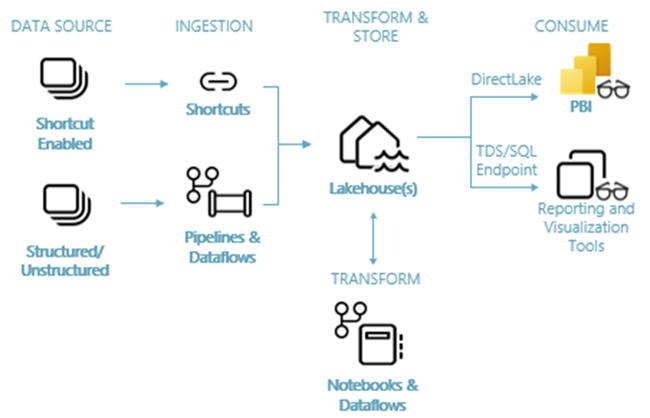
2. Data Engineering & Lakehouse
The Lakehouse experience combines the flexibility of a data lake with the reliability and performance of a data warehouse. Built on Apache Spark, it lets data engineers use notebooks to transform massive datasets, create tables, and apply Delta Lake features such as ACID transactions, time travel, and schema enforcement.
Lakehouses are the sweet spot for most modern analytics workloads — supporting both structured and unstructured data in one place.
3. Data Warehouse
For teams that prefer a traditional SQL experience, Fabric offers a fully managed Data Warehouse. It uses T-SQL, separates compute from storage (so you can scale independently), and stores data natively in Delta Lake format.
It delivers excellent performance for BI workloads and complex analytical queries while remaining fully integrated with the rest of the platform.
4. Data Science
Data Science in Fabric provides a collaborative environment for building, training, and deploying machine learning models. You get Spark-based notebooks, integration with Azure Machine Learning for experiment tracking and model registry, and the ability to publish predictive insights directly into Power BI reports.
It lowers the barrier for turning data into actionable AI.
5. Real-Time Intelligence
Real-Time Intelligence (which includes Eventhouse and KQL databases) handles streaming data from IoT devices, logs, clickstreams, and more. It unifies ingestion, transformation, storage, and real-time analytics in one experience.
With the Real-Time hub, you can discover, ingest, and act on streaming data with minimal code — ideal for operational dashboards, anomaly detection, and real-time decision making.
6. Power BI
No modern analytics platform would be complete without world-class visualization. Power BI is natively embedded in Fabric, allowing you to connect directly to lakehouses, warehouses, and semantic models with Direct Lake mode for lightning-fast performance.
You can create stunning reports and dashboards that leverage the entire Fabric data estate.

Why I’m Excited About Fabric
Microsoft Fabric represents a significant leap forward. It removes the friction of managing multiple tools and services, reduces costs through shared storage and compute, and accelerates time-to-insight with built-in AI and governance.
Whether you’re a large enterprise dealing with complex data landscapes or a growing organization looking to modernize your analytics stack, Fabric provides a future-proof foundation.
Final Thoughts
This was just a high-level tour — there’s so much more to explore, from shortcuts and mirroring to industry-specific solutions and advanced Copilot scenarios. In future posts, I plan to dive deeper into specific components, share practical implementation tips, and compare Fabric with other platforms.
If you’re just getting started with Microsoft Fabric, I highly recommend exploring the official documentation and spinning up a free trial workspace. The learning curve is gentle, and the possibilities are enormous.
Thank you for reading ! I’d love to hear your thoughts in the comments. In the next article, we will explore what a Lakehouse is in Microsoft Fabric and understand how it works in detail.
Thanks for reading! Stay tuned for more practical insights on Microsoft Fabric. Subscribe to the newsletter and keep exploring the world of data. 🚀