
Microsoft Fabric Lakehouse: Your All-in-One Data Hub
Hey there! In the previous article, we explored Microsoft Fabric from a high-level perspective. If you haven’t read it yet, I highly recommend checking it out here: Microsoft Fabric.
If you’re dipping your toes into Microsoft Fabric. At its core is the Lakehouse—a smart blend of data lake and warehouse that makes handling big data a breeze. In simple terms, it’s a single spot to store, manage, and analyze all kinds of data without the usual headaches. Let’s break it down in plain English, with some visuals to make it clearer.
What Exactly is a Lakehouse?
Imagine a data lake that’s super flexible for storing raw files, but with the organized querying power of a traditional database. That’s the Microsoft Fabric Lakehouse. It sits on top of OneLake, Fabric’s central storage system, and lets you work with massive amounts of data efficiently. Unlike old-school setups where you’d need separate systems for different data types, Lakehouse unifies everything—cutting down on copies, silos, and costs.
Here’s a diagram showing the overall architecture:

Handling All Kinds of Data: Structured, Semi-Structured, and Unstructured
One of the coolest things about Lakehouse is how it deals with different data flavors:
- Structured Data: Think neat tables like spreadsheets or database rows—sales figures, customer info. Lakehouse stores these in Delta format for fast queries.
- Semi-Structured Data: Stuff like JSON, CSV, or XML files that have some organization but aren’t rigid. Great for logs or app data.
- Unstructured Data: Raw files like images, videos, documents, or audio. No fixed structure, but Lakehouse handles them without a hitch.
This flexibility means you can dump everything in one place and analyze it together—perfect for mixed projects. In the Lakehouse, there’s a “Tables” folder for structured stuff and a “Files” folder for the rest.
To visualize the differences:

The Magic of Shortcuts
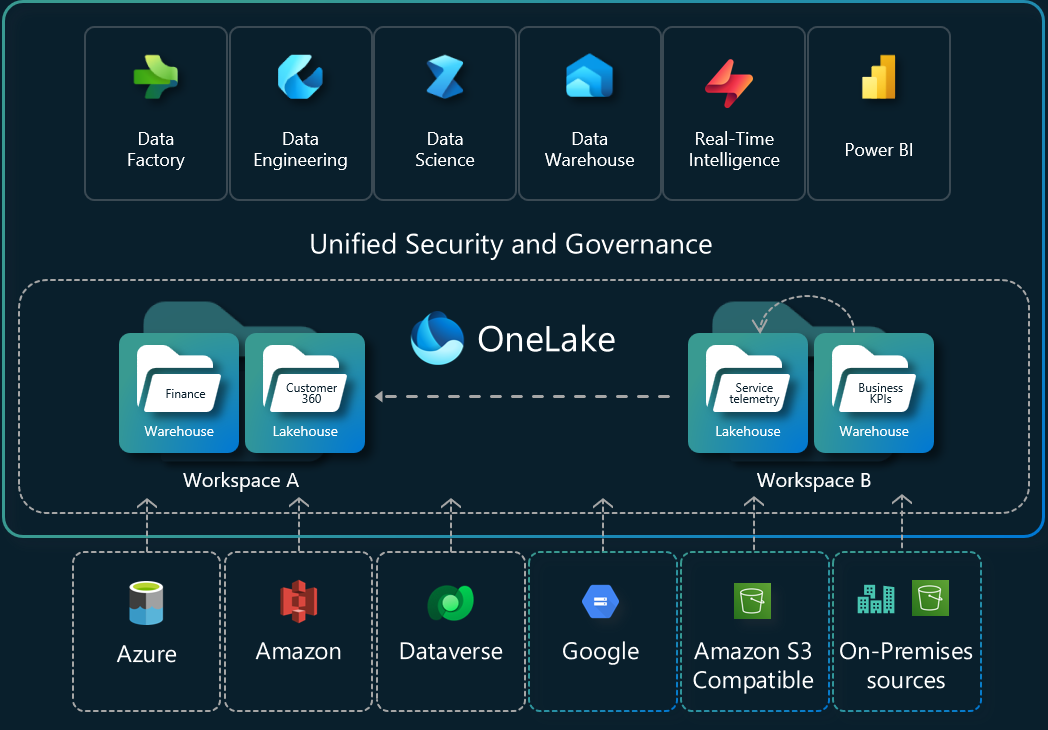
No need to copy data around—enter Shortcuts! These are like virtual links to data stored elsewhere, whether in Azure, Amazon S3, Google Cloud, or even another Fabric workspace. You point to the original spot, and Lakehouse treats it as its own, saving time, money, and storage space. It’s a game-changer for teams sharing data without duplication.
Check out this illustration of how shortcuts connect everything:
Other Key Features Made Simple
- SQL Analytics Endpoint — You get a built-in SQL endpoint automatically, so you can query your data using regular SQL — just like a traditional data warehouse.
- Apache Spark — For heavy lifting: cleaning, transforming, and processing very large datasets.
- Delta Lake format — Makes tables reliable, fast, and supports ACID transactions (safe updates and deletes).
- Ready for AI & Analytics — Connects smoothly to the rest of Fabric for machine learning, real-time insights, and Power BI reports.
Final Thoughts
The Fabric Lakehouse removes most of the old pain points:
- No more moving data between lake and warehouse
- No more format conversion nightmares
- One place for raw files, cleaned tables, and analytics
It’s simple, powerful, and scales as your data grows.
Want to go further? In the next blog post we’ll explore the Fabric Data Warehouse — how it works together with the Lakehouse and when to use each one.
Thanks for reading! Stay tuned for more practical insights on Microsoft Fabric. Subscribe to the newsletter and keep exploring the world of data. 🚀
Pingback: Microsoft Fabric Data Warehouse - Fabric BI