
Lakehouse vs. Warehouse in Microsoft Fabric: Which One Should You Choose?
Hello again! In our previous article, we explored Microsoft Fabric Data Warehouse , Microsoft Fabric Data Warehouse is a fully managed, enterprise-grade relational data warehouse optimized for structured data and high-performance SQL analytics. If you missed it, go check Fabric Data Warehouse out for context.
Many people get confused because both are built on the same foundation (OneLake and Delta Parquet format), yet they serve different needs. Today, we’ll clear up the confusion with a simple comparison, key differences, real-world scenarios, and guidance on when to pick one—or use both together.
This is one of the most common questions in Fabric, so let’s break it down in plain English.
Quick Overview: What They Really Are
- Lakehouse — A modern “data lake + warehouse” hybrid. It handles raw, semi-structured, and structured data in one place. You ingest everything (logs, JSON, images, CSVs, etc.), process with Spark (Python, Scala, etc.), and query with SQL via its built-in SQL analytics endpoint (read-only T-SQL access).
- Warehouse — A full relational data warehouse optimized for structured data and business intelligence. It gives you complete T-SQL read/write support (CREATE, INSERT, UPDATE, DELETE, stored procedures), ACID transactions across multiple tables, and top performance for complex BI queries and star schemas.
Both live in OneLake, so your data is never duplicated unnecessarily—shortcuts and automatic sync make them work together seamlessly.
Here’s a high-level architecture view showing how Lakehouse and Warehouse fit into Fabric (both powered by OneLake):
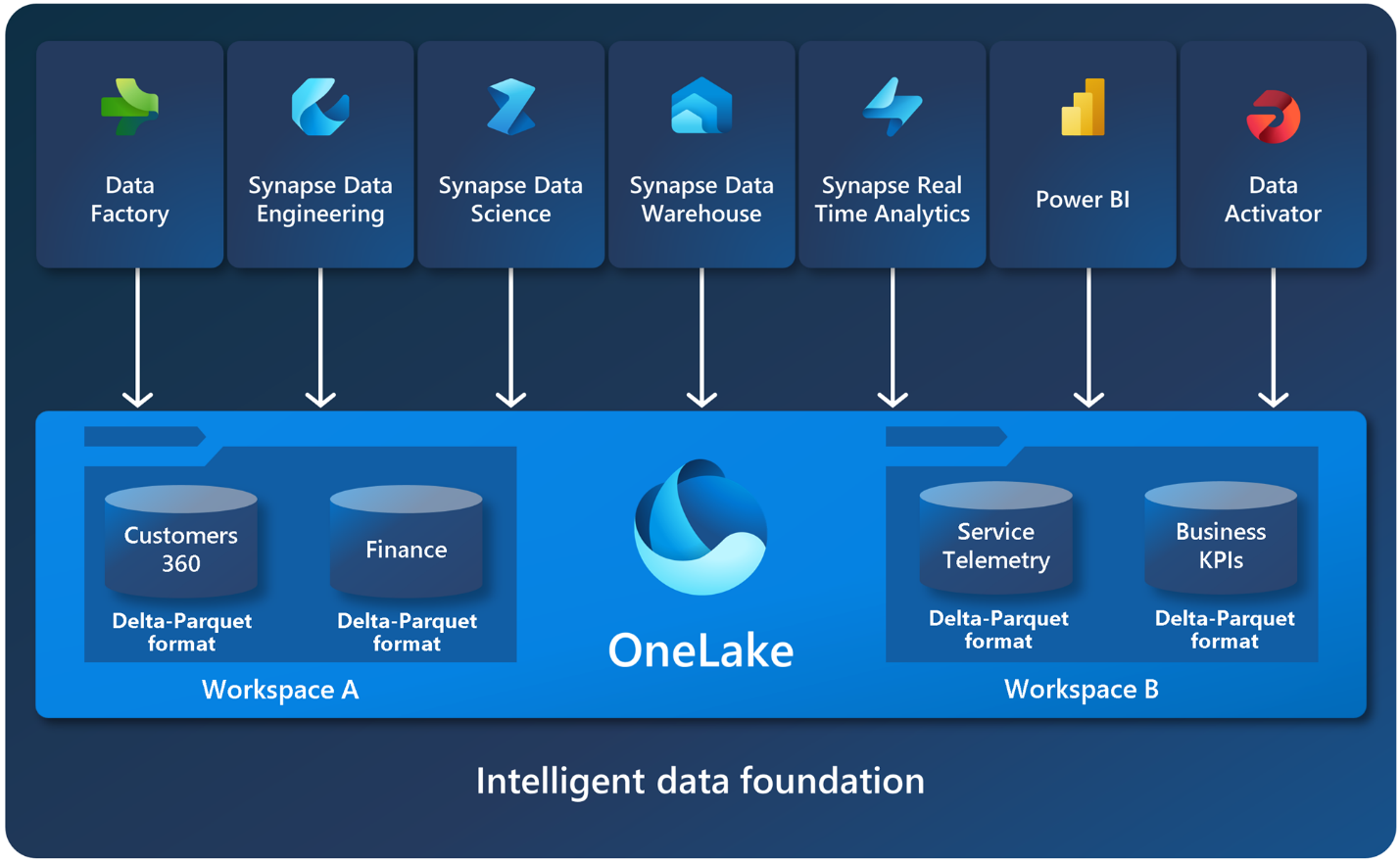
This above diagram highlights the unified OneLake foundation and how read-only SQL endpoints connect Lakehouses while Warehouses support full read/write.
Key Differences: Side-by-Side Comparison
| Feature | Lakehouse | Warehouse |
|---|---|---|
| Best for | Raw + diverse data, data engineering, ML/AI | Structured BI, reporting, governed analytics |
| Data Types | Structured, semi-structured, unstructured | Primarily structured |
| Primary Engine | Apache Spark (PySpark, Spark SQL, Scala, etc.) | T-SQL (MPP SQL engine) |
| T-SQL Access | Read-only via SQL analytics endpoint | Full read/write T-SQL |
| Transactions | ACID on single table (Delta) | Full multi-table ACID transactions |
| Typical Users | Data engineers, data scientists | BI developers, analysts, SQL pros |
| Workloads | ETL, big data processing, ML notebooks | Star/snowflake schemas, complex joins, BI |
| Write Operations | Spark notebooks, pipelines | T-SQL scripts, stored procedures |
| Performance Focus | Flexible processing on massive raw data | Ultra-fast queries on modeled, structured data |
This table captures the core trade-offs—Lakehouse gives flexibility, Warehouse gives SQL power and governance.
When to Choose Lakehouse
Pick Lakehouse when:
- You deal with raw, messy, or unstructured data (logs, IoT, JSON, images, videos).
- You need Spark for heavy transformations, machine learning, or Python-based data science.
- Your team has data engineers/scientists comfortable with notebooks and PySpark.
- You want one place for the full data lifecycle: ingest raw → clean → analyze → ML.
- You’re building a medallion architecture (bronze/silver/gold layers) for big data.
Example: A company ingesting streaming IoT sensor data and web logs, running ML models to predict failures, then serving cleaned data for BI.

This reference architecture shows Lakehouse as the central hub for ingesting and transforming diverse data before optional modeling in Warehouse.
When to Choose Warehouse
Pick Warehouse when:
- Your focus is business intelligence, dashboards, and reporting in Power BI.
- Data is highly structured (fact/dimension tables, star schemas).
- You need full T-SQL capabilities: updates, deletes, stored procedures, multi-table transactions.
- Your team is strong in SQL (from SQL Server, Synapse, etc.) and wants governed, performant BI.
- Query speed and consistency for complex analytics are critical.
The Best Approach: Use Both Together!
In most real-world Fabric projects, you don’t have to choose one—use both!
- Lakehouse as your foundation: Ingest raw data, do heavy ETL/ML with Spark, create silver/gold Delta tables.
- Warehouse as your BI layer: Use shortcuts to read Lakehouse tables (no copy needed), apply final modeling, and run high-performance T-SQL for reports.
Microsoft calls this “better together.” The SQL analytics endpoint on Lakehouse gives read-only T-SQL access, while a full Warehouse adds read/write power.
Many recommend the medallion pattern:
- Bronze (raw) → Lakehouse
- Silver (cleaned) → Lakehouse
- Gold (modeled for BI) → Warehouse (or Lakehouse tables queried via endpoint)
Quick Decision Checklist
- Lots of unstructured/semi-structured data or ML? → Lakehouse
- Pure BI/reporting on structured data with complex SQL? → Warehouse
- Team loves Python/Spark? → Lakehouse
- Team loves T-SQL and migration from SQL Server? → Warehouse
- Need both raw exploration + governed BI? → Both (most common winning combo)
Final Thoughts
The confusion comes because Lakehouse and Warehouse overlap a lot—both use Delta on OneLake—but they target different strengths. Lakehouse brings openness and versatility for modern data/AI workloads. Warehouse delivers classic warehouse reliability for BI and SQL-heavy analytics.
Start small: Create a trial workspace, ingest sample data into a Lakehouse, then create a Warehouse shortcut to it and query both ways. You’ll quickly see what fits your needs.
If this helped clarify things, drop a comment or share your own Fabric experience. In future posts, we can explore real examples, like building a medallion architecture or migrating from Synapse.
In our next blog post, we’ll dive deeper into the Eventhouse in Microsoft Fabric and key features.
Thanks for reading! Stay tuned for more practical insights on Microsoft Fabric. Subscribe to the newsletter and keep exploring the world of data. 